
What is Online Exam Screen
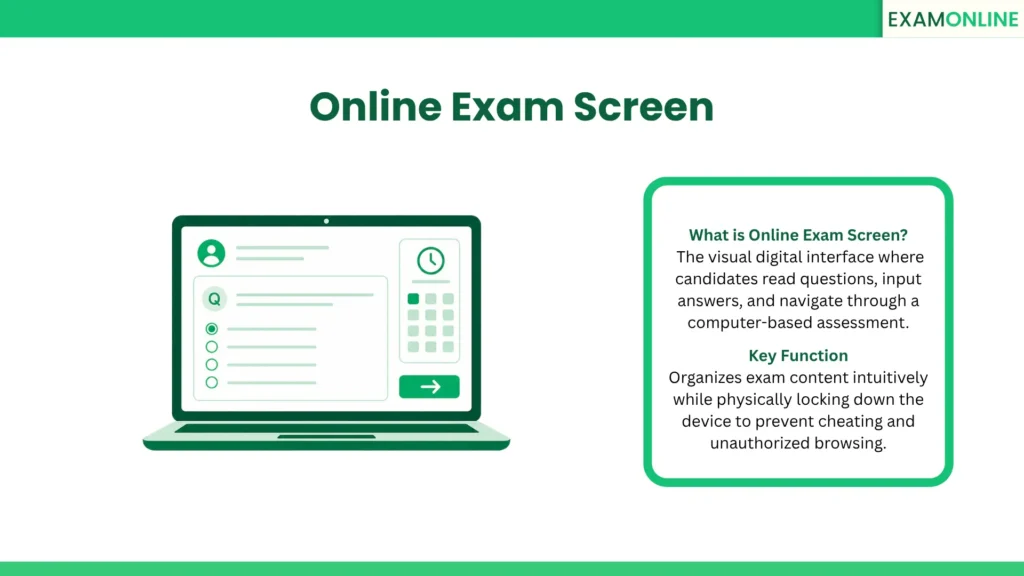
An Online Exam Screen is the direct digital interface and visual dashboard that a candidate interacts with while taking a computer-based assessment. If the overarching testing software is the engine of the evaluation, the online exam screen is the steering wheel and dashboard. It completely replaces the physical test booklet, the scratch paper, and the bubble-fill answer sheet, consolidating all these elements into a single, cohesive digital display.
The primary objective of this interface is to present examination content clearly while providing intuitive navigation. Because candidates are often under immense pressure, the screen must be highly organized, visually accessible, and entirely free of digital clutter. A well-designed testing interface ensures that a candidate’s final score reflects their actual academic or professional knowledge, rather than their ability to figure out confusing software controls. By standardizing the visual environment, organizations ensure every single test-taker receives the exact same fair, focused, and secure evaluation experience.
Features of Online Exam Screen
To replicate the ease of taking a paper test while leveraging the power of digital media, the interface relies on specific structural and functional elements. The core visual components of a professional online exam screen include:
- Question Palette: A navigational grid typically located on the right side of the screen. It displays the status of all questions, color-coding them to show which ones are answered, unanswered, or marked for later review, allowing candidates to jump between sections instantly.
- Interactive Main Console: The central viewing area where the actual question stem and the multiple-choice options (or text boxes) are displayed. This area dynamically resizes to accommodate high-definition images, video prompts, or interactive charts.
- Persistent Digital Timer: A clearly visible countdown clock, usually pinned to the top corner of the screen, ensuring candidates can manage their time effectively without needing a physical watch.
- Accessibility Controls: Built-in toggle switches that allow the candidate to increase the font size, switch to a high-contrast dark mode, or activate text-to-speech tools directly on the screen without leaving the exam environment.
Security in Online Exam Screen
Because the visual interface is the only thing standing between the candidate and the internet, it must be highly fortified against unauthorized behavior. The screen itself becomes an active participant in maintaining test integrity.
When a candidate enters a high-stakes Proctored Exam/Test, the interface transitions into a locked-down state. It expands to cover the entire monitor, disabling the taskbar, hiding standard browser menus, and completely blocking the candidate’s ability to open search engines or external files. To prevent unauthorized outside assistance, the system actively blocks any background Remote Desktop Control applications from capturing or sharing the live display.
Furthermore, the screen incorporates specific visual security cues. It typically displays a small, picture-in-picture feed from the candidate’s webcam, serving as a psychological deterrent and confirming that Online Proctoring is actively engaged. If a candidate attempts to minimize the window or use unauthorized keyboard shortcuts, the screen instantly displays a stark warning message, alerting both the candidate and the live Proctor to the rule violation.
Benefits of Online Exam Screen
Investing in a highly optimized, user-friendly digital interface provides immense psychological and operational advantages. The primary benefits of a superior testing screen include:
- Reduced Cognitive Overload: A clean, minimalist visual layout prevents candidates from feeling overwhelmed, allowing them to focus 100% of their mental energy on solving the actual problems presented to them.
- Real-Time Progress Tracking: The visual color-coding of the question palette gives candidates immediate feedback on their exam progression, drastically reducing the chances of accidentally leaving a question blank before final submission.
- Enhanced Engagement: By moving away from static paper, the digital screen allows for rich, interactive question types, making the testing experience feel much more modern and relevant to real-world tasks.
- Immediate System Feedback: If a network connection drops momentarily, the screen provides instant visual notifications, reassuring the candidate that their previous answers are saved and preventing unnecessary panic.
Applications of Online Exam Screen
The flexibility of a digital display allows administrators to tailor the visual environment to suit vastly different types of high-stakes evaluations across various industries:
- Language and Communication Testing: When evaluating a candidate’s Verbal Ability, the screen can flawlessly display massive, multi-paragraph reading comprehension passages side-by-side with the related questions, eliminating the need to scroll endlessly up and down.
- Engineering and IT Certifications: The interface can seamlessly transform into a split-screen layout, displaying a technical problem on the left while providing a fully functional coding compiler or digital scratchpad on the right.
- Medical Licensing: The screen is used to display highly detailed, high-resolution anatomical x-rays or patient charts, requiring candidates to click specific graphical hot-spots to submit their diagnostic answers accurately.
Conclusion
The online exam screen is a foundational element of modern digital testing. It is the critical touchpoint where candidates demonstrate their skills and where organizations enforce their security protocols. By providing a secure, intuitive, and highly organized visual interface, test creators can eliminate technical friction and ensure that every evaluation is an accurate reflection of true human capability.
ExamOnline is a comprehensive online exam platform that powers sophisticated, secure, and user-friendly digital testing environments, ensuring candidates have a seamless experience from the moment they log in until their final submission.
Related Terms: Tab Switching, Session Logs, Screengrab, Screen Mirroring, Navigation.